Database Management System
The database symbol is a cylinder because databases were originally stored on a hard disk of stacked plates.
Question: Why use a database management system (DBMS) instead of a filesystem?
- Data consistency (schema)
- Crash recovery
- Efficient data retrieval
- Concurrent access to data
- Physical data independence (ability to change how data is stored without changing application code)
A DBMS allows users to store, query, and update databases in accordance to some data model. Examples of data models include:
- Relational
- Key-value
- Graph
- Document
- Vector
DBMS design principles:
- More specialized databases, driven by application semantics
- Few primitives (relational operators) which can be composed
- Data independence; applications should not need to understand how data is stored
- Declarative programming
Relational Algebra
Early database applications tightly coupled logical and physical layers, which made it difficult to make any changes to the program. To deal with the maintenance overhead, Ted Codd wrote A relational model of data for large shared data banks, which later became the basis of the relational data model.
The key ideas are:
- Data should be stored in simple data structures (relations)
- The DBMS should be responsible for the physical storage of the data
- Data should be accessed through high-level, declarative language, so that the DBMS can optimize it
Terminology:
- A relation is an unordered set of tuples
- A tuple is a set of attribute values
- A primary key uniquely identifies a single tuple in a relation
- A foreign key specifies that an attribute from one relation maps to a tuple in another relation
Relational models can define constraints, such as:
- Table schema is respected
- Primary keys are unique
- The foreign key exists in another table
- Global assertions
There are two different types of data management languages (DMLs):
- Procedural: the query specifies how to find the desired result (e.g. relational algebra)
- Declarative: the query only specifies what data is wanted (e.g. SQL)
Relational algebra is based on set algebra. That means that it represents relations as unordered lists with no duplicates. Each operator takes in one relation and outputs a new relation.
| Symbol | Meaning |
|---|---|
Select all tuples which satisfy pred | |
| Generate a relation with only the specified attributes | |
| Generate a relation that contains all tuples that appear in either relation | |
| Generate a relation that contains all tuples that appear in both relations | |
| Generate a relation that contains all tuples that appear in but not in | |
| Generate the Cartesian product of the two relations | |
| Perform a natural join; only return tuples which have common attributes |
SQL
Unlike in relational algebra, SQL assumes that data is stored in a bag, not a set. This means that there can be duplicated rows. This is for efficiency reasons—if we do a union on two very large tables, it is expensive to deduplicate the output.
There are several classes of SQL operations:
- Selection ()
- Projection ()
- Aggregation
- Join
- Views
GROUP BY rules:
- Non-aggregated values in
SELECToutput must appear inGROUP BYclause. - Each
GROUP BYclause will cause the output to contain one tuple per group.
Types of JOIN:
- Cross join: Cartesian product
- Inner join: every pair that matches, dropping non-matching pairs
- Outer join: every pair that matches, keeping non-matching tuples
Within inner joins, there is:
- Natural join (): match tuples where the shared attributes are equivalent
- Theta or equijoin (): match tuples using some join predicate defined by
- Semi join (): same as theta join, except output relation only contains attributes from
- Anti semijoin (): tuples of that do not match with any tuple of (not technically an inner join)
Within outer joins, there is:
- Left outer join (): match all combinations of tuples where the shared attributes are equivalent, plus all tuples in that have no match in
- Right outer join (): the same as left outer join but reversed
- Full outer join (): union of left and right outer joins
For more details about SQL syntax, go to the SQL page.
A view is a (virtual) table that is the result of a SQL query. Typically, user applications are built on top of views rather than the base tables. It is usually not possible to update a view.
Because views may be accessed frequently, it may be impractical to run the query every time. We may want to maintain a materialized view, a cache of the view that is refreshed on updates or periodically.
Schema Design
A good database schema ensures data integrity and has good performance. These goals are typically in conflict with each other.
On one end of the extreme, we have only one spreadsheet with all the data. This has good performance because it is not necessary to perform any joins. But it is difficult to maintain data integrity with respect to updates, insertions, and deletions.
For example, consider the following spreadsheet:
| student_id | course_id | room | name |
|---|---|---|---|
| 1 | 1 | 100 | Alice |
| 2 | 1 | 200 | Bob |
| 2 | 2 | 200 | Bob |
- If we want to update the room number for a particular course, we need to iterate through the entire database to update the fields
- We cannot insert a student that is not enrolled in a course
- If we delete all students enrolled in a course, we lose information about which course is assigned to which room
The alternative is to decompose the schema into multiple relations, or normalizing the data. This reduces redundancy, which is good for data integrity. However, we will typically need more joins, leading to a decrease in performance.
There are multiple levels of normalization:
| Name | Description |
|---|---|
| First Normal Form (1NF) | Each cell should contain only a single value and not a list of values |
| Second Normal Form (2NF) | A table should not contain any partial dependencies where a column depends on part of a composite primary key |
| Third Normal Form (3NF) | A table should not contain any transitive dependencies where a column depends on another column |
Layers of a DBMS
- The storage manager handles reading and writing raw pages to and from the physical disk
- The buffer pool manager manages an in-memory cache of pages
- The access methods determines how data is organized and accessed on disk
- The operator execution describes how relational operators consume and produce tuples
- The query planner parses, optimizes, and compiles a query into a plan of operators to execute
Storage Manager
Files and Pages
The DBMS stores the database as files on the disk.1 Files are organized as a collection of pages (or blocks).2 The storage manager is responsible for reading and writing fixed-sized pages to and from the disk.
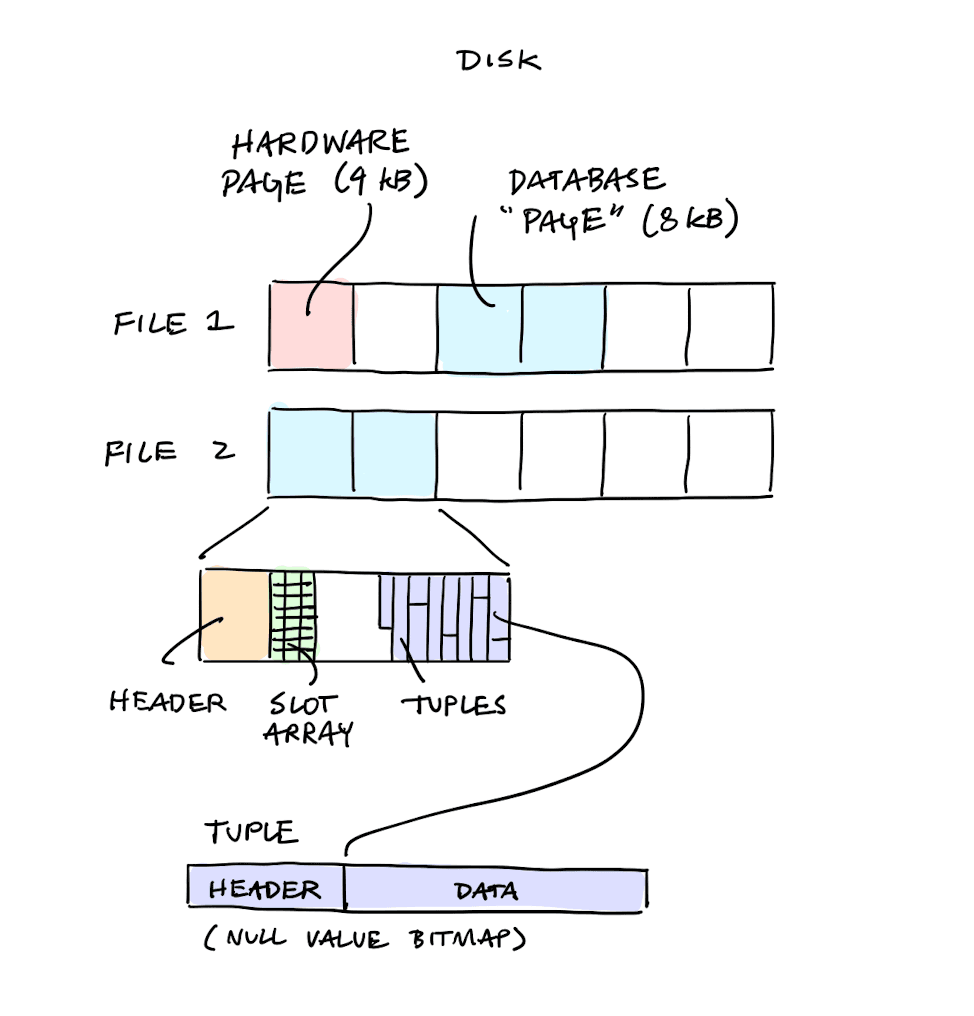
DBMSs try to ensure that consecutive pages are stored on consecutive disk blocks. On magnetic hard disks, doing random access costs seek time and rotational latency. While this is less significant for SSDs, there may be I/O controller overheads.
Page and Tuple Layout
Every database page contains a header with metadata3 about the page's contents as well, as the actual tuples.
One naive way to lay out tuples on a page is by directly placing them in a fixed array of slots. However, this requires that each tuple be a fixed size. It also makes deletions difficult.
The most common layout scheme for a page is called slotted pages. The slotted page adds another layer of indirection called the slot array, which maps slots to the tuple offsets. The header keeps track of the number of used slots and the offset of the last slot used.
Some benefits of the slotted pages are:
- During deletion, the slot array can be easily modified to hide the deletion
- Slots can be heterogeneous sizes
- Compaction of the actual data can be delayed
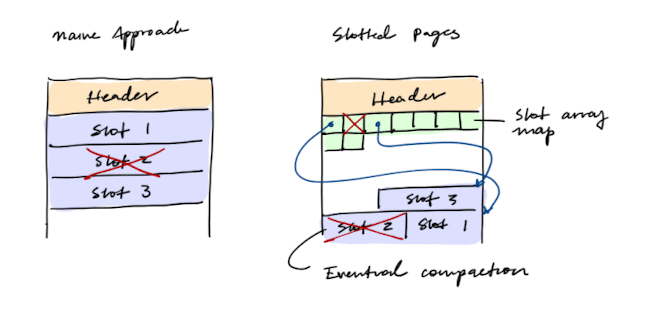
The DBMS also needs a way to keep track of individual tuples. The tuple's identifier (also called record ID) is typically the page ID and the slot number.
Tuples may have a header to specify things like the null value bitmap. Having a null value bitmap allows us to save space, since we don't need to store the null value.4
The Operating System
Traditional file I/O operations involve system calls to read from or write to a file. Memory mapping (mmap) allows a file to be accessed directly through virtual memory addresses.
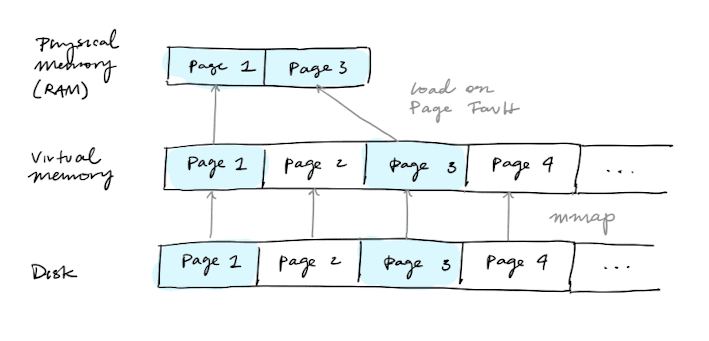
Many DBMSs avoid using memory-mapped files because they require fine-grained control over I/O operations. In general, DBMSs know more about their workloads and can better optimize file fetches and flushes than the OS. Sometimes, the OS can even get in the way, like in the case of double-buffering.
However, most modern operating systems do use the file system API exposed by the operating system. Early DBMS systems used custom file systems on raw storage, but this had portability issues when switching to different hardware, and the performance benefit was minimal (5-10%).
Buffer Pool Manager
The buffer pool manager sits directly on top of the storage manager. It manages an in-memory cache of pages so that the DBMS does not need to hit the disk on every access. The cache is called a buffer pool and each page is called a frame.
The buffer pool manager handles:
- Fetching a page (from the buffer pool if cached, else asking the storage manager to read it from disk)
- Pinning and unpinning pages
- Deciding which page to evict when the pool is fool
- Marking pages as dirty and flusing them back via the storage manager
The page table keeps track of pages that are currently in memory, and it also keeps additional metadata about the dirty flag and the reference count. The page table is usually a fixed-sized map protected with latches to ensure thread-safe access.
The DBMS cannot evict pages from the buffer pool if the reference count is non-zero. The DBMS should probably also write back the page to disk before eviction if the page is dirty. But the database wants to carefully control when dirty pages are written back to disk. It wants to use the RAM as a write-back cache for disk, not as a write-through cache.
Access Methods
Access methods sit on top of the buffer pool manager. To find, insert, or delete a record, an access method uses a record ID to locate it. It then asks the buffer pool manager for the page by page ID, and then uses the page's slotted layout to find the tuple at the given slot number.
File Organization
Here are some data structures for file organization:
- Heap file organization
- Hashing file organization
- Sequential or sorted file organization (ISAM)
- Tree file organization
A heap file is a collection of pages with tuples that are stored in random order. A page directory tracks the physical location of pages for a database file, and also records metadata about available space.
A hashing file organization groups tuples by a hash of some attribute, so the underlying data structure is a hash table. A hash table5 is an array of values. For a given key and number of slots n, we can compute hash(key) % n to get an offset into the array.
For a database, we want a hash function that is fast and has a low collision rate. We do not want or need cryptographic properties, like one-way or random oracle. Examples of good database hash functions include CRC-64, MurmurHash, Google CityHash, Facebook XXHash, and GoogleFarmHash.
Table Indexes
The file organizations above describe how the base table itself is stored. A table index is a separate, redundant data structure built on top of the base table for efficient access using some attribute.
It is the job of the DBMS to:
- Ensure that the table and index are synchronized
- Figure out the best index to use during query execution
B+ Trees
The standard index implementation is the B+ tree.6 A B+ tree is a self-balancing tree that keeps data sorted and allows searches, sequential access, insertions, and deletions in O(log n).
It should maintain the following invariants:
- It is perfect balanced, and every leaf node is at the same depth in the tree
- Every node other than the root is at least half-full
Let be the number of keys on a node and let be the maximum number of children of a node. Then it must be the case that:
Every B+ tree node holds an array of key-value pairs. The keys are always derived from the columns the index is built on.7 The values differ by node type:
- In an inner node, the value is just a pointer to a child node
- In a leaf node, the data is either the actual tuple (in a clustered primary index) or a pointer to the tuple (in a non-clustered secondary index)
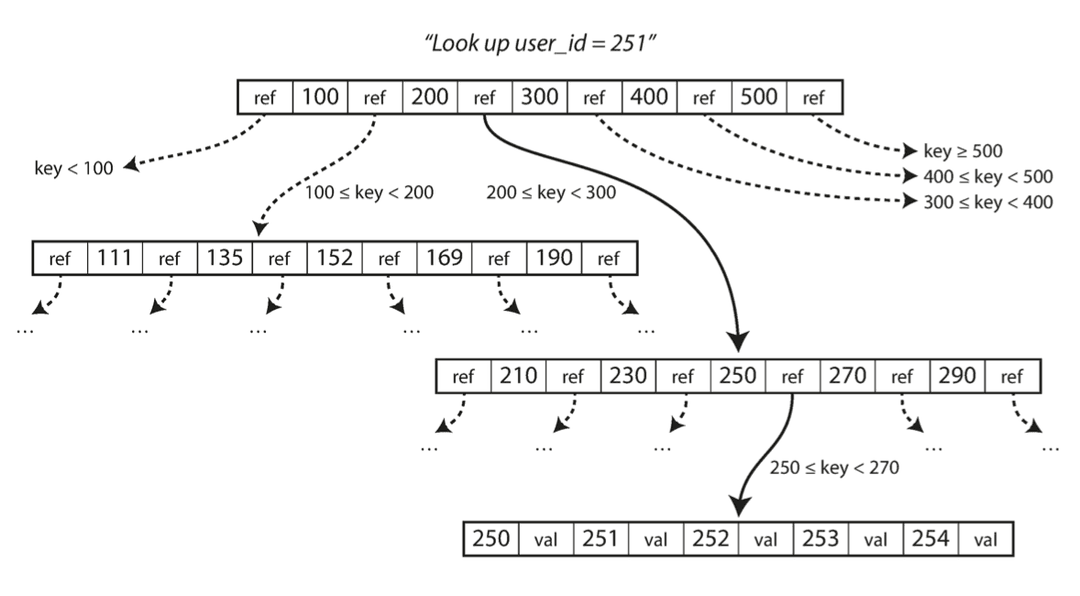
A B+ tree node also contains sibling pointers for the sibling pages on the left and right.
To insert, find the correct leaf and insert the entry in sorted order.
If the leaf is now over capacity, split it:
- Divide its entries evenly into two leaf nodes
- Copy the middle key up into the parent as a separator
- Insert a new entry for this separator into the parent
If that insertion overflows the parent too, split it the same way, but push up (rather than copy up) the middle key. Repeat up the tree until a node doesn't overflow, or a new root is created.
To perform deletion, find the leaf node and remove the entry. If the leaf node is no longer at least half-full, try to redistribute by borrowing from adjacent siblings. If redistribution fails, merge the leaf node with a sibling. If a merge occurred, we must delete the entry from the parent of the leaf node.
Operator Execution
Just as we cannot assume that a table fits entirely in memory, a disk-oriented DBMS cannot assume that a query result fits in memory. We will use the buffer pool to implement algorithms that need to spill to disk. We are also going to prefer algorithms that decrease the total amount of I/O.
A few common operators are scans, sorts, aggregations, and joins.
Scans
To get a list of tuples, we can either perform a sequential table scan or an index scan.
To perform a table scan, for each page in the table:
- Retrieve it from the buffer pool
- Iterate over each tuple and check whether to include it
The DBMS maintains an internal cursor that tracks the last page and slot it examined.
To perform an index scan, the DBMS uses the index to find the tuples that the query needs. In a multi-index scan, the DBMS needs to choose the indices it uses,8 and it may have to perform set intersection. Set intersection can be done with bitmaps, hash tables, or Bloom filters.
Sorting
We may want our tuples to be sorted in a particular way in order to implement ORDER BY, DISTINCT, GROUP BY, or merge joins.
If the data fits in memory, then we can use a standard in-place sorting algorithm. If the data does not fit in memory, then we need to do some kind of external sorting. One algorithm for external sorting is the external merge sort:
- Sort chunks of data that fit in memory into sorted chunks (runs)
- Combine runs into longer runs
Suppose we have pages of data to sort, but only buffer pages to work with at any time.
-
In the first pass, we repeatedly load pages, sort them in memory, and write them back out as a sorted run of size . After this pass, we have sorted runs, each of size .
-
In subsequent passes, we need to merge sorted runs together. To merge runs simultaneously, we need input buffers plus output buffer to write the merged result. Because we only have buffers total, we can merge at most runs at a time.
Each merge pass reduces the number of runs by a factor of , since every run gets merged into . Thus, the total number of passes is given by .
At each pass, we read and write each page once, so the total number of operations is
Aggregations
We may also want to quickly find tuples with the same distinguishing attributes for grouping.
There are typically two implementations of aggregations: sorting and hashing. Sorting aggregates is useful to fulfill ORDER BY and DISTINCT conditions. But if we do not need the data to be ordered, then hashing is usually a better alternative.
Hash Aggregates
To perform hashing, we create a temporary hash table as the DBMS scans the table. For each record, we check whether there is already an entry in the hash table. For DISTINCT, we discard duplicates. For GROUP BY we perform the aggregate computation.
Some aggregations can be done incrementally as each tuple is seen. We store pairs of the form (group_key, val). If we find a matching group_key, we just update the val. Otherwise, we insert a new (group_key, val) pair. Aggregations where we can just maintain a running value include SUM, COUNT, AVG, MIN, and MAX.
External Hash Aggregates
Using hashing for aggregation only works if everything fits in memory. Otherwise, we need to use an external hash aggregate. Here is the divide-and-conquer algorithm:
- Partition phase: Hash each row into one of several buckets based on the grouping key. Write each bucket out to disk.
- Rehashing phase: Read in each partition, build an in-memory hash table for each partition, and compute the aggregation.
Suppose we have buffers. We will use buffers for the partitions and buffer for the input data. We will use a hash function to split tuples into these partitions on the disk, and we will we flush the partition onto disk when the buffer page fills up.
After we do this, for each partition on disk, we will read it into memory and build a second hash function . Then we'll go through each bucket of this hash table to bring together matching tuples. This assumes that each partition fits in memory.
Assuming we have total pages, we will need operations (1 read and write) to partition the initial data and operations to rehash it. This gives us a total of , plus whatever needs to be done to the aggregation results.
Joins
There are several categories of join algorithms, including nested loop join, hash join, and sort-merge join.
Suppose we want to perform a binary equijoin on and , where has pages with total tuples, and has pages with total tuples.
Simple Nested Loop Joins
In a simple nested join loop, we scan the outer table once () and scan the inner tables once for each tuple in the outer table (). This will cost us operations. Thus, in general, we want the smaller table to be the outer table.
foreach tuple r in R:
    foreach tuple s in S:
        if r and s match: output
Block Nested Loop Joins
A block nested loop join improves on the simple algorithm by loading as many pages of into memory at once as the buffer allows, instead of just one page at a time.
Suppose we have buffers available. We split them as:
- buffers for holding one block of
- 1 buffer for the current page of being scanned
- 1 buffer for storing the output being written
First, we need operations to read all of . Because we have buffers, we will need to process blocks of . For each block, we do one full rescan of , costing . This will give us a total cost of
If the outer relation completely fits in memory, then the cost is just .
foreach block br in R:
    foreach block bs in S:
        foreach tuple r in br:
            foreach tuple s in bs:
                if r and s match: output
Index Nested Loop Joins
The basic nested loop join is inefficient because we need to do a sequential search over the inner table to check a match. Instead of doing a sequential search, we can also do an index nested loop join to find inner table matches.
Assuming that the cost of each index probe is some per tuple, the total cost is
foreach tuple r in R:
    foreach tuple s in index("r = s"):
        if r and s match: output
Hash Joins
For a hash join, the general algorithm is:
- Build phase: Scan the outer table and populate a hash table using the hash function on the join attributes
- Probe phase: Scan the inner table, and use on each tuple to jump to the matching bucket in the hash table
During the build phase, we can also construct a Bloom filter.9 In the probe phase, we can check the filter first to skip probes that are guaranteed not to match.
External Hash Joins
If the hash table doesn't fit in memory, then we need to perform an external hash join. One algorithm is called a partitioned hash join, or a grace join.
First, we partition both and into buckets using a hash function . We then perform a regular hash join on each pair of matching buckets using another hash function .
If a bucket pair still doesn't fit in memory, recursively partition it with a new hash function () until the pieces are small enough, then build a hash table on one side and probe with the other.
The partitioning phase will take operations, since we need to read and write every page of both relations. Once the data is partitioned, we go bucket pair by bucket pair, reading each page exactly once for a cost of operations. This gives us a total cost of:
Sort-Merge Join
In a sort merge-join, we:
- Sort both tables on the join keys using an external merge sort
- Step through the two sorted tables with cursors and emit matching tuples
This has a cost of:
- Sort cost for :
- Sort cost for :
- Merge cost:
Sort-merge join is useful when the input tables are already sorted, if the output must be sorted on the join key, or if the relation doesn't fit in main memory.
Summary
| Algorithm | I/O Cost |
|---|---|
| Simple Nested Loop Join | |
| Block Nested Loop Join | |
| Index Nested Loop Join | |
| Sort-Merge Join | |
| Hash Join |
Query Planning
A DBMS converts a query into a plan comprised of logical operators. Data flows from the leaves up toward the root, which is the result of the query.
A DBMS's processing model defines how the system executes a query plan.
Iterator Model
In the iterator model, each query plan operator implements three functions: open(), next(), and close(). The operator implements a loop that calls next() on its children to retrieve their tuples and then process them. On each invocation, the operator returns either a single tuple or a null.
The iterator model allows for tuple pipelining. However, some operators like hash joins and ORDER BY must block until their child emit all their tuples.
There are actually three different notions of pages in a DBMS:
- Hardware page, the atomic unit of I/O to a disk (4 KB)
- OS page, the software abstraction of a hardware page (4 KB)
- Database page, set by the DBMS (4-16 KB)
Large database pages are good for large sequential writes, but it is more complicated to ensure atomicity. Additionally, more data needs to be loaded into RAM for small reads and writes.
For more information about different hashing schemes, see Hash Tables
A B+ tree is often used interchangeably with a B-tree. In a regular B-tree, keys and values are stored in all the nodes in the tree. A B+ tree stores values only in leaf nodes, and inner nodes are only used for search. While B-trees are more space-efficient, B+ trees are better for sequential or concurrent access.
For example, consider the query below:
SELECT * FROM students
WHERE age < 30
AND dept = 'cs'
If there is an index on
ageand an index ondept, one way to run the query is to use the indices to fetch records whereage < 30and records wheredept = 'cs', and then take their intersection.We could also instead only use the
ageindex and manually filter thedeptcondition. Or vice-versa. Or use neither indices.